
Introduction
The internet has become an important part of everyday life. People use online platforms for shopping, banking, communication, learning, and entertainment. While technology makes life easier, it also increases the risk of cyber threats and data theft.
Every time users browse websites, create accounts, or make online payments, they share personal information. Hackers and cybercriminals constantly look for ways to steal this data for fraud, identity theft, and financial scams.
In 2026, online threats are more advanced than ever. Cybercriminals use phishing emails, fake websites, malware, and AI-powered scams to target internet users worldwide. Even a small mistake, such as using a weak password or clicking a suspicious link, can expose sensitive information.
Protecting personal data online is now essential for everyone. Whether you use a smartphone, laptop, or tablet, understanding cybersecurity practices can help reduce online risks.
This guide explains the best ways to protect your personal data online and improve digital security in 2026.
What Is Personal Data?
Personal data refers to information that identifies an individual.
Examples include:
- Full name
- Email address
- Phone number
- Home address
- Banking details
- Passwords
- Social media accounts
- Identity documents
Hackers target this information because it can be used for fraud and identity theft.
Why Personal Data Protection Is Important
Protecting personal data helps users maintain privacy and avoid cybercrime.
Prevents Identity Theft
Cybercriminals can use stolen information to impersonate victims online.
Protects Financial Information
Banking details and payment information must stay secure to prevent fraud.
Maintains Privacy
Personal messages, photos, and files should remain private.
Reduces Online Risks
Strong cybersecurity habits lower the chance of becoming a cyber attack victim.
Common Threats to Personal Data
Understanding cyber threats helps users stay protected.
Phishing Scams
Phishing attacks trick users into sharing sensitive information through fake emails or websites.
For example, a fake banking email may ask users to verify account details.
Malware
Malware is harmful software that steals information or damages systems.
Types include:
- Viruses
- Spyware
- Trojans
- Ransomware
Weak Passwords
Simple passwords are easy for hackers to guess.
Public Wi-Fi Risks
Unsecured public Wi-Fi networks can expose personal information.
Fake Mobile Apps
Cybercriminals create fake applications to steal user data.
Social Engineering
Hackers manipulate users into revealing confidential information.
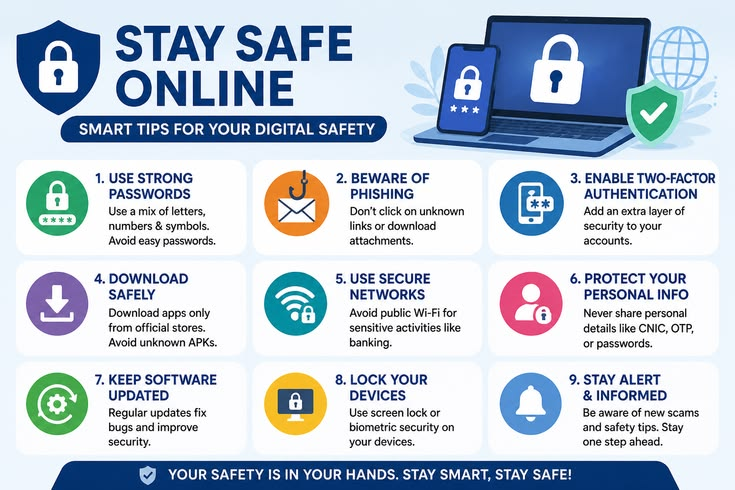
Use Strong Passwords
Strong passwords are one of the best defenses against cyber attacks.
Tips for Creating Strong Passwords
- Use at least 12 characters
- Include numbers and symbols
- Avoid personal information
- Use uppercase and lowercase letters
Weak Password Example
password123
Strong Password Example
T7@pL4#xQ9!
Users should avoid reusing passwords across multiple accounts.
Enable Two-Factor Authentication
Two-factor authentication adds extra security to online accounts.
After entering a password, users must complete a second verification step.
Examples include:
- SMS verification codes
- Authentication apps
- Fingerprint verification
This feature makes accounts much harder to hack.
Avoid Suspicious Emails and Links
Hackers often send fake emails designed to steal information.
Warning Signs of Phishing Emails
- Spelling mistakes
- Urgent messages
- Unknown senders
- Suspicious links
- Requests for passwords
Safe Practice
Always verify emails before clicking links or downloading attachments.
Keep Devices and Software Updated
Software updates fix security weaknesses that hackers may exploit.
Users should regularly update:
- Smartphones
- Laptops
- Browsers
- Antivirus software
- Mobile apps
Automatic updates improve online security.
Use Antivirus and Security Software
Reliable antivirus software helps detect and block cyber threats.
A good security program should include:
- Malware protection
- Real-time scanning
- Firewall support
- Web protection
Antivirus software improves overall cybersecurity.
Be Careful on Public Wi-Fi
Public Wi-Fi networks are often unsafe because hackers can intercept data.
Public Wi-Fi Safety Tips
- Avoid banking transactions
- Do not access sensitive accounts
- Use a VPN service
- Disable file sharing
Using mobile data is often safer than public Wi-Fi.
Secure Your Social Media Accounts
Social media platforms contain personal information that hackers may target.
Social Media Safety Tips
- Use private account settings
- Avoid sharing sensitive information
- Use strong passwords
- Enable two-factor authentication
Users should also be careful when accepting friend requests from unknown people.
Download Apps from Trusted Sources
Fake apps can contain malware designed to steal information.
Safe App Practices
- Use official app stores
- Read reviews before downloading
- Check app permissions
- Avoid unknown developers
Users should uninstall apps they no longer use.
Backup Important Data
Data backups protect files from cyber attacks and device failures.
Backup Options
- Cloud storage
- External hard drives
- USB drives
Regular backups help users recover important information quickly.
Protect Online Banking Information
Online banking requires extra security because financial accounts are major targets.
Banking Security Tips
- Use secure websites
- Avoid public Wi-Fi
- Monitor transactions regularly
- Enable banking alerts
Users should immediately report suspicious transactions.
Use Secure Websites
Secure websites use encryption to protect user data.
How to Identify Secure Websites
Look for:
- HTTPS in the address bar
- A lock icon near the website URL
Avoid entering personal information on unsecured websites.
The Role of Artificial Intelligence in Cybersecurity
Artificial intelligence is changing online security in 2026.
Benefits of AI Security
AI systems can:
- Detect suspicious activity
- Identify fraud faster
- Monitor online threats
- Improve cybersecurity systems
Risks of AI Cybercrime
Hackers also use AI to create smarter phishing scams and fake websites.
Users must stay alert and informed.
Protecting Children’s Personal Data Online
Children are also vulnerable to online threats.
Tips for Parents
- Teach safe internet habits
- Monitor online activity
- Use parental controls
- Limit sharing of personal information
Parents should educate children about online dangers.
Practical Examples of Data Protection
Example 1: Fake Shopping Website
A user enters payment information on a fake online store.
Safe action:
Verify website security before making purchases.
Example 2: Weak Password Problem
A hacker easily guesses a simple password.
Safe action:
Use long and unique passwords for every account.
Example 3: Public Wi-Fi Risk
A traveler checks bank accounts using airport Wi-Fi.
Safe action:
Use a VPN or avoid sensitive activities on public networks.
Future Trends in Personal Data Protection
Biometric Authentication
Fingerprint and facial recognition systems are becoming more common.
Zero Trust Security
Companies now verify every user and device before granting access.
Stronger Privacy Laws
Governments are introducing stricter data protection regulations.
AI-Based Security Tools
AI systems continue improving cybersecurity defenses.
FAQs
What is personal data?
Personal data includes information like names, passwords, emails, and banking details.
Why is personal data protection important?
It helps prevent identity theft, fraud, and privacy violations.
What is the safest way to create passwords?
Use long passwords with numbers, symbols, and mixed letters.
What is phishing?
Phishing is a scam that tricks users into sharing personal information through fake emails or websites.
Is public Wi-Fi dangerous?
Yes, public Wi-Fi can expose personal data if users access sensitive accounts.
Why should I update my software?
Updates fix security weaknesses and improve device protection.
Can smartphones be hacked?
Yes, smartphones can be targeted through fake apps, malware, and phishing attacks.
What should I do if my account gets hacked?
Change your password immediately, enable two-factor authentication, and contact the service provider.
Conclusion
Protecting personal data online has become extremely important in 2026. Cyber threats continue to grow as hackers use advanced tools, phishing scams, and malware attacks to target internet users worldwide.
Simple cybersecurity habits like using strong passwords, enabling two-factor authentication, updating software, and avoiding suspicious links can greatly improve online safety. Users should also protect social media accounts, avoid unsafe Wi-Fi networks, and regularly back up important data.
Cybersecurity is not only about technology. It also depends on awareness and smart online behavior. By following the strategies explained in this guide, users can protect personal information, reduce cyber risks, and enjoy a safer online experience.