
Introduction
Cybersecurity has become one of the most important topics in today’s digital world. Almost everyone uses the internet for banking, shopping, communication, education, and entertainment. While technology makes life easier, it also creates new risks. Cybercriminals constantly look for ways to steal data, hack accounts, and spread malware.
Many people think cyberattacks only happen to big companies, but this is not true. Small businesses, students, freelancers, and regular internet users can also become victims. A single weak password or suspicious email can lead to serious problems.
In 2026, online threats are growing faster than ever. Hackers use advanced tools, fake websites, phishing emails, and AI-powered attacks to target users. This is why understanding cybersecurity is now essential for everyone.
In this guide, you will learn simple and practical cybersecurity tips that can help you stay safe online. Whether you use a smartphone, laptop, or tablet, these strategies will improve your digital security and protect your personal information.
What Is Cybersecurity?
Cybersecurity is the practice of protecting computers, networks, devices, and data from cyber threats. It includes tools, technologies, and safety practices designed to prevent unauthorized access and attacks.
Cybersecurity helps protect personal information, passwords, financial data, social media accounts, business systems, cloud storage, and online transactions.
Without proper cybersecurity measures, hackers can steal data, damage systems, or even lock users out of their devices.
Why Cybersecurity Is Important
Cybersecurity is important because our daily lives depend heavily on technology. From online banking to social media, most activities require internet access.
Protects Personal Information
Hackers can steal names, addresses, passwords, and credit card details if systems are not secure.
Prevents Financial Loss
Cyberattacks can lead to stolen bank information and online fraud.
Keeps Businesses Safe
Companies rely on cybersecurity to protect customer data and maintain trust.
Protects Privacy
Cybersecurity helps prevent unauthorized access to emails, photos, and private files.
Reduces Identity Theft
Strong security measures make it harder for criminals to impersonate users online.
Common Types of Cybersecurity Threats
Understanding common threats can help users avoid dangerous situations online.
Phishing Attacks
Phishing is one of the most common cyber threats. Hackers send fake emails or messages pretending to be trusted companies.
For example, you may receive an email claiming your bank account is locked. The email asks you to click a link and enter your password. The website looks real, but it is fake.
Malware
Malware is harmful software designed to damage devices or steal information. Types of malware include viruses, spyware, ransomware, and trojans.
Ransomware
Ransomware locks files or systems until the victim pays money to the attacker.
For example, a business suddenly loses access to all files and receives a message demanding payment.
Password Attacks
Hackers try to guess weak passwords or use stolen password databases.
Social Engineering
Attackers manipulate people into sharing confidential information.
AI-Powered Cyber Attacks
Modern hackers now use artificial intelligence to create smarter scams and automated attacks.
Best Cybersecurity Practices in 2026
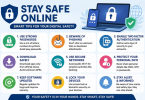
Following simple security practices can greatly reduce online risks.
Use Strong Passwords
A strong password should include uppercase letters, lowercase letters, numbers, and symbols.
Avoid using your name, birthdate, or simple words like “password123”.
An example of a strong password is G7!kL9@pQ2#.
Enable Two-Factor Authentication
Two-factor authentication adds an extra security layer.
Even if hackers know your password, they still need a second verification code.
Popular examples include SMS codes, authentication apps, and fingerprint verification.
Keep Software Updated
Software updates fix security weaknesses.
Always update operating systems, browsers, antivirus software, and mobile apps.
Ignoring updates can leave devices vulnerable.
Avoid Suspicious Links
Never click unknown links in emails or messages.
Before clicking, check the sender, verify the website address, and look for spelling mistakes.
Use Antivirus Software
Reliable antivirus software can detect and block threats before they harm your device.
Backup Important Files
Regular backups protect your data from ransomware and hardware failures.
Backup methods include external hard drives, cloud storage, and USB drives.
Use Secure Wi-Fi Networks
Public Wi-Fi networks are often unsafe.
Avoid accessing banking apps, important accounts, or business files on public networks without a VPN.
Cybersecurity Tips for Small Businesses
Small businesses are common targets because they often have weaker security systems.
Train Employees
Employees should learn how to identify phishing emails and scams.
Limit Access
Not every employee needs access to sensitive data.
Install Firewalls
Firewalls help block unauthorized access.
Use Cloud Security
Secure cloud platforms provide better protection for business data.
Monitor Systems Regularly
Businesses should regularly check systems for unusual activity.
The Role of Artificial Intelligence in Cybersecurity
Artificial intelligence is changing cybersecurity in many ways.
How AI Helps Cybersecurity
AI can detect unusual activity, identify threats faster, analyze large amounts of data, and automate security tasks.
For example, banks use AI systems to detect suspicious transactions instantly.
Risks of AI in Cybersecurity
Hackers also use AI to create advanced scams and automated attacks.
This creates a constant battle between security experts and cybercriminals.
Cybersecurity for Social Media Users
Social media accounts are major targets for hackers.
Use Private Account Settings
Limit who can see your information.
Avoid Sharing Sensitive Information
Do not post phone numbers, addresses, banking details, or travel plans online.
Watch for Fake Profiles
Scammers create fake accounts to steal information.
Use Different Passwords
Never use the same password for all social media accounts.
Mobile Device Cybersecurity
Smartphones contain valuable personal information.
Download Apps Carefully
Only install apps from trusted sources like official app stores.
Check App Permissions
Some apps request unnecessary access to your camera, microphone, contacts, or location.
Enable Device Lock
Use PIN codes, fingerprint locks, or face recognition.
Keep Bluetooth Off When Not Needed
Hackers can sometimes exploit active Bluetooth connections.
Cloud Security in 2026
Cloud storage has become extremely popular for businesses and personal users.
Benefits of Cloud Security
Cloud platforms offer data backups, remote access, advanced encryption, and disaster recovery.
Risks of Cloud Storage
Improper settings can expose sensitive files.
Always use strong passwords, enable two-factor authentication, and check privacy settings.
Importance of Cybersecurity Awareness
Technology alone cannot stop cybercrime. Users must also stay informed.
Cybersecurity awareness helps people recognize scams, avoid risky behavior, and protect sensitive information.
Many successful cyberattacks happen because users make simple mistakes.
Future Cybersecurity Trends
Cybersecurity continues to evolve every year.
Zero Trust Security
Companies now follow “Zero Trust” systems where no user or device is automatically trusted.
Biometric Authentication
Fingerprints and facial recognition are becoming more common.
AI Security Tools
AI-based security systems will continue improving threat detection.
Quantum Computing Risks
Future quantum computers may challenge current encryption methods.
Increased Privacy Regulations
Governments are introducing stronger data privacy laws.
Practical Cybersecurity Examples
Example 1: Email Scam
A student receives an email saying they won a free smartphone. The email asks for banking information.
The safest action is to delete the email and report it as spam.
Example 2: Weak Password
A user uses “123456” as their password. Hackers easily access the account.
The safer option is to use a long and unique password with symbols and numbers.
Example 3: Public Wi-Fi Risk
A traveler logs into online banking using airport Wi-Fi.
The safest choice is to use a VPN or wait for a secure network.
How to Create a Personal Cybersecurity Plan
A cybersecurity plan helps reduce online risks.
Step 1: Identify Important Accounts
Focus on securing banking apps, email accounts, social media, and cloud storage.
Step 2: Update Passwords
Use unique passwords for every account.
Step 3: Enable Security Features
Activate two-factor authentication, device encryption, and security alerts.
Step 4: Backup Files
Store backups regularly.
Step 5: Stay Informed
Follow cybersecurity news and updates.
FAQs
What is cybersecurity in simple words?
Cybersecurity means protecting devices, networks, and online information from hackers and cyber threats.
Why is cybersecurity important?
Cybersecurity protects personal data, prevents financial loss, and keeps online accounts safe.
What are the biggest cybersecurity threats?
Common threats include phishing, malware, ransomware, password attacks, and social engineering scams.
How can I improve my online security?
You can improve security by using strong passwords, enabling two-factor authentication, updating software, and avoiding suspicious links.
Is antivirus software enough for protection?
Antivirus software helps, but users also need safe online habits and strong passwords.
What is phishing?
Phishing is a scam where attackers trick users into sharing personal information through fake emails or websites.
Can small businesses be hacked?
Yes, small businesses are frequent targets because they often have weaker security systems.
What is two-factor authentication?
Two-factor authentication requires users to verify their identity using a second method, such as a code sent to their phone.
Conclusion
Cybersecurity is no longer optional in today’s digital world. As online threats continue to grow in 2026, users must take security seriously. Simple habits like using strong passwords, enabling two-factor authentication, updating software, and avoiding suspicious links can greatly reduce cyber risks.
Businesses and individuals both need cybersecurity awareness to protect sensitive information and maintain online safety. Technology will continue evolving, and cybercriminals will also develop new attack methods. Staying informed and following best practices is the best defense against modern cyber threats.
By applying the cybersecurity tips shared in this guide, you can create a safer digital experience for yourself, your family, and your business.